Due Today: Continue development of P1; Exercise 1
For Today: Demo: “Flip the Bird” Spatial Interpolation + Track Mattes; Studio for E2 + P1 motion design development

AE Resources
- Watch: Track Matte AE Tutorial
- Alpha channels, masks, and mattes | helpx.adobe.com
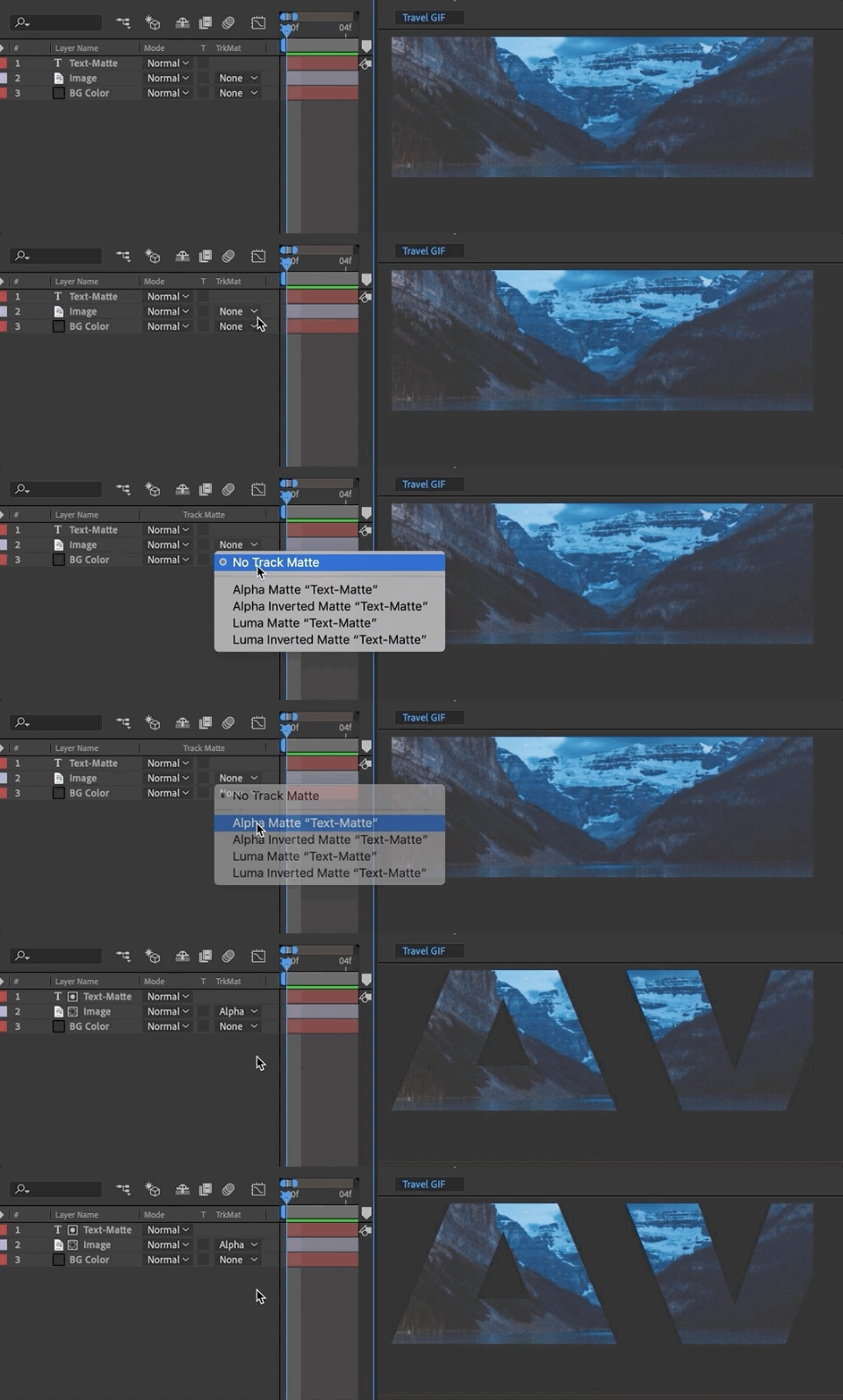
schoolofmotion.com
Compositing is placing one image on top of another (such as text on a photo). Mattes are used to isolate one portion of an image—such as a layer mask or track matting where one layer references the transparency of another layer.
Spatial Interpolation + Track Matte Demo
Issues with AE?
Cached Preview Error: https://www.schoolofmotion.com/blog/cached-preview
Space in AE: https://www.schoolofmotion.com/blog/ram-after-effects
Exercise 2
This is the second of 4 exercises in this course. Please review the requirements and rubric before beginning.
Exercise 2 Steps
Exercise 2:
Create a 5-10 second After Effects composition that explores how objects with varying weights move through space and synchronize with an audio track. This exercise develops skills in timing, weight, and the relationship between motion and sound.

1. File Setup and Management:
- Create a Composition: Set the duration to 5-10 seconds and dimensions to 1920 x 1080 pixels.
- Set up Background: Choose a solid color or simple gradient for the background to complement the objects.
- File Management: Organize your assets (shapes, audio, etc.) in your project folder for easy access and efficiency.

2. Object Design and Animation:
- Object Creation: Design two distinct objects (shapes, text, or vector graphics). Make one object feel heavy and the other light, using visual elements like size, shape, or color.
- Object Animation: Animate both objects to fall through the scene at different speeds. The heavier object should fall faster, while the lighter object should fall slower and bounce or float.
- Weight and Timing: Focus on how the motion of each object conveys its weight (e.g., heavy objects might fall straight down, while light objects might have a more dynamic, bouncy motion).

3. Parenting and Interaction:
- Third Object: Add one more object (shape, text, or vector graphic) that moves through the scene in some other way (e.g., horizontally or diagonally).
- Parenting: Use After Effects’ parenting feature to make the two falling objects follow this third object in an interesting, unexpected way (e.g., they could follow its path, rotate around it, or mimic its movement in some other fashion).

4. Audio Synchronization:
- Select an Audio Track: Choose a short, instrumental audio track from Free Music Archive or Pixabay. It should be upbeat or dynamic, with clear shifts in rhythm or mood.
Note: While you are welcome to find your own audio, here are a few curated options to get you off the ground quickly: (1) Cool Funk (2) Quirky Jumpy Bouncy Fun (3) Piano Classical (4) Rhythmic Drums (5) Risk (6) Sport Percussion (7) Cinematic Time Lapse
- Insert the Audio: Add the audio to your composition, ensuring it fades in at the start and fades out at the end for a smooth experience.
- Sync the Motion to Audio: Align the movement of your objects to specific beats, rhythms, or crescendos in the music. The motion should feel choreographed to the audio, with pauses, accelerations, or rotations happening in time with the music.

5. Animation Techniques::
- Choreography and Timing: Pay attention to how the objects move together. Consider how the changes in speed and direction can amplify the rhythm of the audio track.
- Scale, Rotation, or Position: Experiment with scaling, rotating, or repositioning the objects in response to key moments in the audio. For example, the heavier object could “crash” in time with a beat, or the lighter object could bounce on an upbeat section.

6. Formal Design Qualities:
- Visual Design: Use color, positive/negative space, and balance within the composition. The design should feel cohesive and thoughtfully arranged.
- Object Interaction: Ensure the objects interact meaningfully within the space and with each other, enhancing the overall motion and story.

7. Rendering and Submission:
- Render your composition in H.264 format with the Vimeo 720 preset.
- Upload your final video to Vimeo.
Exercise 2 Rubric
| Exercise #2 | WEAK / MISSING | AVERAGE | GOOD | EXCEPTIONAL |
|---|---|---|---|---|
| File Setup and Management: Composition between 5–10s; Dimensions 1920 x 1080; Solid Layer setup; Correct rendering and upload. | 0 | 2.25 | 2.5 | 3 |
| Object Design and Motion: Creativity in object choice, representation of weight, and use of parenting for interaction between objects. | 0 | 2.25 | 2.5 | 3 |
| Audio Synchronization: How well the motion of the objects aligns with the rhythm, beats, or mood changes in the audio. | 0 | 2.25 | 2.5 | 3 |
| Animation Techniques: Skill in using After Effects tools for choreography, motion timing, and object interactions over time. | 0 | 2.25 | 2.5 | 3 |
| Formal Design Qualities: Visual style; consideration of positive/negative forms within changing space; Effective use of design elements (color, space, balance). | 0 | 2.25 | 2.5 | 3 |
For Next Class
- P1 20–30s of motion design. Render BEFORE class and upload to Vimeo or D2L discussion (30s) for full-class crit.
Due 9.30
- Exercise 2: Watch the 2 falling forms vids above for guidance. Once complete, upload to D2L Exercise 2 (upload to Vimeo, if possible, and upload link, (watch videos under today’s resources for additional guidance).
Project 1 Schedule
- 9.16 – Demo: Spatial Interpolation + Track Mattes; Studio
- 9.18 – P1 Final Crit #3 (20–30s)
- 9.23 – Lecture: History of Motion Graphics; Studio
- 9.25 – SUBMIT P1; P1 Final Presentation; Begin P2 – Lecture: Principles of Motion Graphics