Due Today: Storyboards + P1: 2s Motion Test
For Today: Discuss: Motion Design Process; P1 Small Groups;Demo: Precomposing, Nesting, Text Masks, Text Animators, Audio Import
Motion Design Process
3-motion-design-process-v2-1
- Ben Radatz | MK12
- Made in the Middle (kinetic type) | Ben Radatz
- Johnny Hardstaff Sketchbooks
- Modicum Agency Process Example
- Eve Weinberg Styleframes
- Storyboarding in UX Design
- Storyboarding Paper
- Nike Battle Force Process (storyboard) | Oddfellows
AE Keyboard Shortcuts
- (s) scale, (p) position, (a) anchor point, (r) rotation, (t) opacity
hold shift to select multiple - (u) see all keyframes for layer
- (u + u) to see all adjusted properties
- (+) or (-) to expand or zoom on timeline
- (,) or (.) to expand or zoom composition panel, (shift + /) to fit to screen
- (j) or (k) key to jump between keyframes in timeline
- (shift + cmd + n) apply mask over text layer
- (cmd + double-click) on pan behind (anchor point tool) to center anchor point
AE Demos
AE Resources
Audio Resources
- Soundly
- MusOpen
- AudioBlocks
- http://freemusicarchive.org/curator/Creative_Commons/
- https://archive.org/details/netlabels
- http://www.beatpick.com/
- https://www.bensound.com/royalty-free-music/3
- http://magnatune.com/genres/
- https://freesound.org/browse/tags/music/
- https://musopen.org/
- http://surf4u.com/
- https://filmstro.com/music
- https://www.purple-planet.com/royalty-free-music
- https://www.hooksounds.com/
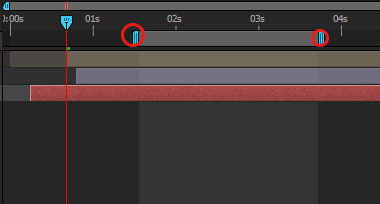
Important Note on Rendering: To render out a portion of your work rather than an entire composition, resize the work area on the right side of your timeline panel. The work area selected is the ONLY portion that will render out through the Adobe Media Encoder.
Due Next Class
- 10s of Project 1 rendered before class WITH your audio. Do not upload to Vimeo or D2L, but have ready to play on your computer for critique. If necessary, continue revising storyboard or styleframes per feedback received in crits this past week. Note: Bring headphone for crit.
Due Next Tuesday
- Exercise 1
Project 1 Schedule
- 9.9 – Demo: Compositions/Masks/Audio Sources; Small Group Crit
- 9.11 – Demo: Keyframe Interpolation/Time Remapping/Parenting/Graph Editor/Audio; Exercise 2; P1 Crit #2 (10s)
- 9.16 – Demo: Track Mattes; Lecture: History of Motion Graphics; Studio
- 9.18 – P1 Final Crit #3 (30s)
- 9.23 – Lecture: Principles of Motion Graphics; Studio
- 9.25 – SUBMIT P1; P1 Final Presentation; Begin P2