📌 Weekly Structure (applies every week)
Content Release: Mondays @ 11 AM (Tues @ 11 AM if holiday week)
Deadlines: All assignments due Mon @ noon (or Tue when no Monday class)
ZOOM : Optional. Monday review + critique (recorded). If no Monday class → prerecorded review + Wed @ noon live session.
Critiques: Regular weeks: Mon @ noon → Wed @ noon
No Monday class: Tue @ noon → Thu @ noon
Use discussion board if not in ZOOM
Remote Office Hours: Wednesdays, 1–3 PM → Schedule Here
Week 4 Links & Notes
(specific to this week)
Live Sessions This Week:
👉 Join Live: Mon 9.15 @ noon – Week 4 Review + P1 10s Critique
→ [Join Here]
📺 Watch: Mon 9.15 Review + Live Crit Recording → [Watch Here] approx 45m
Looking Ahead (Week 5)
Next live (recorded) session: Mon Sept 22 @ noon (only live session in Week 5)
This week’s deadlines:
Wednesday, Sept. 17 @ noon
- P1 Crit #2-Participate in Monday’s Zoom Critique or Post/Comment to Discussion Board on D2L “P1: 10s Crit” by Monday @noon. Comment on 3 others by Wednesday@noon (if you do not attend Monday’s ZOOM). You only need to participate in one or the other.
Monday, Sept. 22 @ noon
- 8. 20s–30s of P1 development – Develop in AE. Render. Post to Vimeo + Import to the bottom of your Ideation Story on Medium + Post to D2L Discussion Board
- 9. Exercise 2 – post to Vimeo as “Exercise 2” – due Mon. 9.29
Next week, Project 1 is due at the end of the week. We will begin discussing the Principles of Design which will lead us into our second project.
Weekly Content
Week 4 (Though not required, it is recommended you move through in sequence. To stay on schedule, it is recommended you have 1, 4, 6 completed by Wednesday@noon. All 10 need to be complete by Sunday @midnight):
- Attend or watch a recording of Monday Zoom. We will review this week’s content.
SECTION I – Motion Design - Watch Lecture Video – Lecture: History of Motion Graphics
- Review History of Motion Graphics Resources
SECTION II – P1 + Exercise 2 - Continue development of P1 Kinetic Typography
- Review P1 Submission Guidelines
- P1 Crit #2-Participate in Monday’s Zoom Critique or Post/Comment to Discussion Board on D2L “P1: 10s Crit” by Monday @noon. Comment on 3 others by Wednesday@noon (if you do not attend Monday’s ZOOM). You only need to participate in one or the other.
- Due next Mon. 9.22: 20s–30s of p1 development in AE (post to Vimeo – and medium, if possible)
- Due next Mon. 9.29: Complete Exercise 2
SECTION III – AE - Watch Demo AE Videos
- Review After Effects Resources + Audio Resources (as needed)
SECTION I – MOTION DESIGN
2. Motion History
This week focuses on the history of motion graphics. Next week, we will move into the principles of motion design.
5-history-of-motion-graphics3. Motion History Resources
- Gifs of Early Optical Devices
- The Horse in Motion by Muybridge
- Pixar’s Zoetrope
- 1895 Workers Leaving the Factory, Lumber
- 1902 Trip to the Moon, Melies
- 1925 Pure Cinema
- 1940 Spook Sport, Mary Ellen Butes and Norman McLaren
- 1960s Stan Vanderbeek
- 1961 John Whitney Catalog
- 1967 Stan Vanderbeek and Ken Knowlton
- Humorous Phases of Funny Faces
- History of Animation
SECTION II – P1
4.
Project 1: Kinetic Typography
due: Monday 9.29 @noon
Continue P1 Kinetic Typography (due at the end of week 5). This week, we will focus on the development of our motion designs with our final 30s critique.
P1 Final Considerations
- Does your kinetic motion design support or hinder your audio?
- The what: typographic choices communicated in a planned sequence
- The how: use of spacing, timing, speed, pacing, and movement
- Consider how positive/negative forms change through motion and transition.
- Give attention to the manner elements appear and leave the frame.
- Consider how the text interacts WITHIN the frame’s edges.
- Do your formal choices express your motion?
Audio Guidelines for Motion Graphics
- Keep overall audio levels below -6dB to avoid distortion and provide headroom for adjustments.
- Dialogue/voiceovers should sit between -12dB and -6dB for clarity, and background music should be quieter, between -18dB and -12dB.
- Use keyframes to fade audio in and out at the start and end of your motion videos for smooth transitions.
- Balance audio layers (dialogue, sound effects, music) so no single element overpowers the others unless intentional.
- Monitor audio levels using the Audio Meters panel (found under Window > Audio Meters) to ensure consistency and avoid peaking above 0dB.
- Keep sound design simple—audio should complement, not distract from, the visuals.
- Keep Learning: https://www.premiumbeat.com/blog/sound-in-after-effects/
5. P1 Final Submission
- Project 1 Final: Final motion design uploaded to Vimeo. Upload your final files in a ZIPPED folder named “lastname_p1_kineticType” to the assignments folder on D2L “Project 1”.
- In zipped folder, FINAL .aep file
- In zipped folder, FINAL movie rendering @1080p or 720p (do not need process renderings)
- In zipped folder, Design Boards (file for download) (2.5 pts)- we will go over how to create these next week as PDF
- In zipped folder, written rationale on your concept (2.5 pts) – please submit as PDF
- On Medium, all process work (PDFs, JPEGs, PNGs) needs to be on Medium post (not in zipped folder)
- 3 audio options and initial ideation
- brainstorming/sketches
- mood boards / type exploration
- motion script
- storyboard
- 3 styleframes
- 2s motion test
P1 Process Work
Post/Post to a story called “Kinetic Typography: Ideation” on Medium. How to post on Medium.
- 6. 10s Critique: P1 Crit #2–Participate in Monday Zoom Critique or Post/Comment to Discussion Board on D2L “P1: 10s of Development” (post by Monday@noon / 3 comments by Wed@noon. In D2L, go to Communications > Discussions). You only need to participate in the D2L critique if you do attend the Monday Zoom. Post your link to your uploaded Vimeo file and describe your audio and how you want it to feel. Make note if you are looking for feedback on anything specific.
SECTION III – AE
9. AE Demos
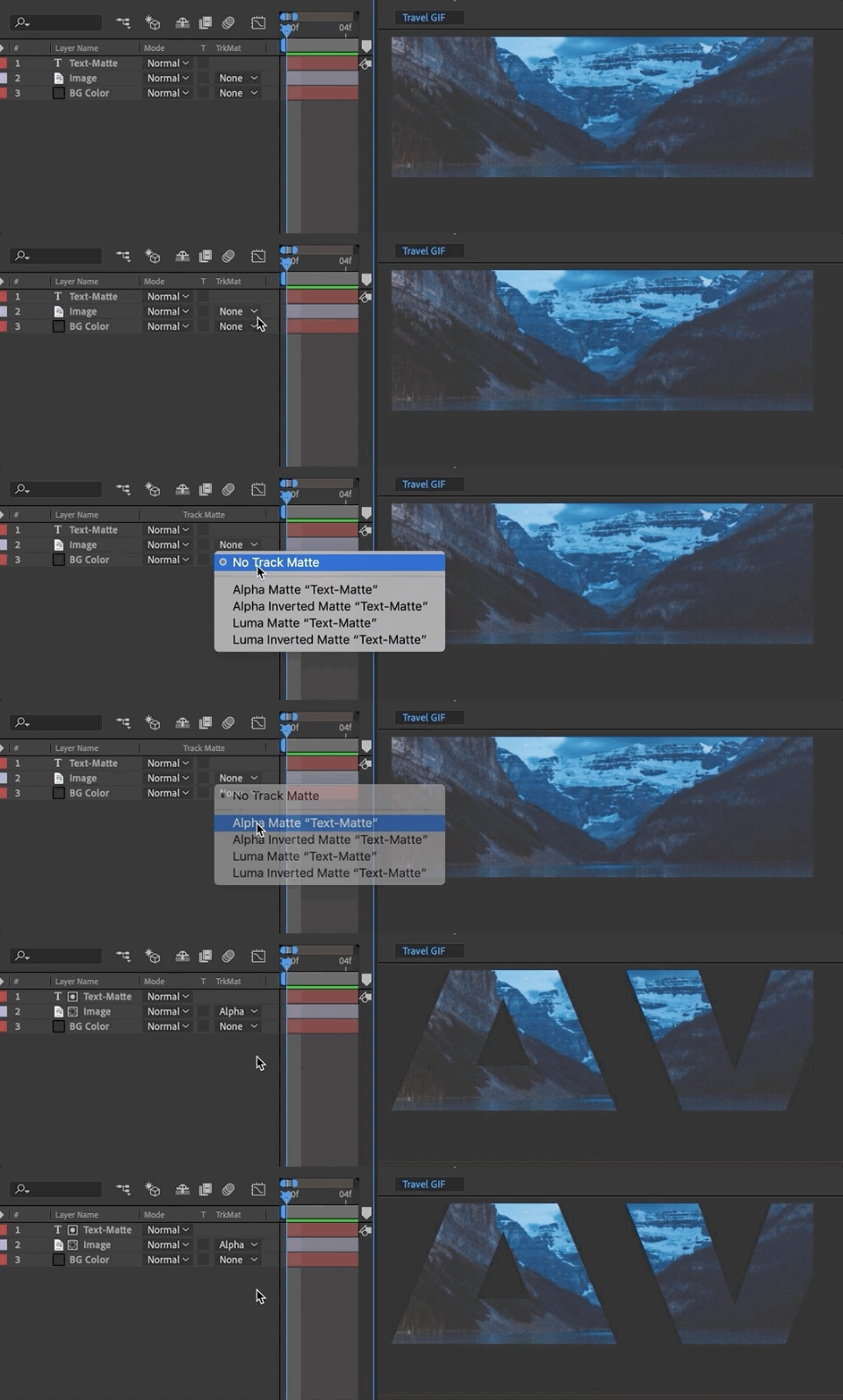
In After Effects, this week we will learn about track mattes. Please watch the video below and review the resources. The handout below can be used for quick reference while working through the application.

AE Handout: Intro to After Effects
Compositing is placing one image on top of another (such as text on a photo). Mattes are used to isolate one portion of an image—such as a layer mask or track matting where one layer references the transparency of another layer.
10. AE Resources
- Read: How to use Track Mattes in AE | School of Motion
- Review: Alpha channels, masks, and mattes | helpx.adobe.com
9.
Exercise 2
This is the second of 4 exercises in this course. Please review the requirements and rubric before beginning.
Exercise 2 Steps
Exercise 2:
Create a 5-10 second After Effects composition that explores how objects with varying weights move through space and synchronize with an audio track. This exercise develops skills in timing, weight, and the relationship between motion and sound.

1. File Setup and Management:
- Create a Composition: Set the duration to 5-10 seconds and dimensions to 1920 x 1080 pixels.
- Set up Background: Choose a solid color or simple gradient for the background to complement the objects.
- File Management: Organize your assets (shapes, audio, etc.) in your project folder for easy access and efficiency.

2. Object Design and Animation:
- Object Creation: Design two distinct objects (shapes, text, or vector graphics). Make one object feel heavy and the other light, using visual elements like size, shape, or color.
- Object Animation: Animate both objects to fall through the scene at different speeds. The heavier object should fall faster, while the lighter object should fall slower and bounce or float.
- Weight and Timing: Focus on how the motion of each object conveys its weight (e.g., heavy objects might fall straight down, while light objects might have a more dynamic, bouncy motion).

3. Parenting and Interaction:
- Third Object: Add one more object (shape, text, or vector graphic) that moves through the scene in some other way (e.g., horizontally or diagonally).
- Parenting: Use After Effects’ parenting feature to make the two falling objects follow this third object in an interesting, unexpected way (e.g., they could follow its path, rotate around it, or mimic its movement in some other fashion). Waiving the parenting requirement.

4. Audio Synchronization:
- Select an Audio Track: Choose a short, instrumental audio track from Free Music Archive or Pixabay. It should be upbeat or dynamic, with clear shifts in rhythm or mood.
Note: While you are welcome to find your own audio, here are a few curated options to get you off the ground quickly: (1) Cool Funk (2) Quirky Jumpy Bouncy Fun (3) Piano Classical (4) Rhythmic Drums (5) Risk (6) Sport Percussion (7) Cinematic Time Lapse
- Insert the Audio: Add the audio to your composition, ensuring it fades in at the start and fades out at the end for a smooth experience.
- Sync the Motion to Audio: Align the movement of your objects to specific beats, rhythms, or crescendos in the music. The motion should feel choreographed to the audio, with pauses, accelerations, or rotations happening in time with the music.

5. Animation Techniques::
- Choreography and Timing: Pay attention to how the objects move together. Consider how the changes in speed and direction can amplify the rhythm of the audio track.
- Scale, Rotation, or Position: Experiment with scaling, rotating, or repositioning the objects in response to key moments in the audio. For example, the heavier object could “crash” in time with a beat, or the lighter object could bounce on an upbeat section.

6. Formal Design Qualities:
- Visual Design: Use color, positive/negative space, and balance within the composition. The design should feel cohesive and thoughtfully arranged.
- Object Interaction: Ensure the objects interact meaningfully within the space and with each other, enhancing the overall motion and story.

7. Rendering and Submission:
- Render your composition in H.264 format with the Vimeo 720 preset.
- Upload your final video to Vimeo.
Exercise 2 Rubric
| Exercise #2 | WEAK / MISSING | AVERAGE | GOOD | EXCEPTIONAL |
|---|---|---|---|---|
| File Setup and Management: Composition between 5–10s; Dimensions 1920 x 1080; Solid Layer setup; Correct rendering and upload. | 0 | 2.25 | 2.5 | 3 |
| Object Design and Motion: Creativity in object choice, representation of weight, and use of parenting for interaction between objects. | 0 | 2.25 | 2.5 | 3 |
| Audio Synchronization: How well the motion of the objects aligns with the rhythm, beats, or mood changes in the audio. | 0 | 2.25 | 2.5 | 3 |
| Animation Techniques: Skill in using After Effects tools for choreography, motion timing, and object interactions over time. | 0 | 2.25 | 2.5 | 3 |
| Formal Design Qualities: Visual style; consideration of positive/negative forms within changing space; Effective use of design elements (color, space, balance). | 0 | 2.25 | 2.5 | 3 |