Read First:
📌 Weekly Structure (applies every week)
Content Release: Mondays @ 11 AM (Tues @ 11 AM if holiday week)
Deadlines: All assignments due Mon @ noon (or Tue when no Monday class)
ZOOM : Optional. Monday review + critique (recorded). If no Monday class → prerecorded review + Wed @ noon live session.
Critiques: Regular weeks: Mon @ noon → Wed @ noon
No Monday class: Tue @ noon → Thu @ noon
Use discussion board if not in ZOOM
Remote Office Hours: Wednesdays, 1–3 PM → Schedule Here
Week 10 Links & Notes
(specific to this week)
Live Sessions This Week:
👉 Join Live: Mon 10.27 @ noon – Weekly Review → [Join Here]
📺 Watch: Mon 10.27 Weekly Review Recording → [Watch Here]
Looking Ahead (Week 11)
Next live (recorded) session: Mon Nov 3rd @ noon (only live session in Week 11)
*non-holiday weeks we will meet on Mondays
This week’s deadlines:
Monday, Nov 3rd @ noon
- Research 3 ideas for Project 3 – (collect statistics, facts, and credible info to support your topic). 30 minute review. Post IDEAS to new Medium Story for P3. Doesn’t have to be comprehensive.
- P3 Big Idea
- 8. Narrative Draft Peer Post for Review – Post for 3 Peer Reviews (start with scripts that do not already have any reviews) P3_Narrative_scripts_F25.pptx
- 9. P3 Narrative Draft D2L Critique Feedback: Feedback on 3 drafts must be specific (avoid saying only positive remarks without any critical suggestions). P3_Narrative_scripts_F25.pptx
- 10. P3 3 Styleframes – Design in Illustrator or Photoshop. Export as JPEG and post to the bottom of recent Ideation Story on Medium. (also post to D2L critique)
- 11. P3 Storyboard – Create in a sketchbook, using index cards (ideal for this project), or in software. Take photo/export and post to the bottom of your P3 Ideation Story on Medium + Post to D2L
- 13. P3 2s Motion Test – Develop in AE. Render. Post to D2L (Vimeo, if possible) + Import to the bottom of your P3 Ideation Story on Medium.
Next week 11, for P3, we will move on to developing our first 10s of P3. The following week we will have our 30s crit.
Weekly Content
Week 10 (though not required, it is recommended you move through in sequence. All items need to be completed by end of the week):
- Attend or watch recording of Monday Zoom. We will review this week’s content.
SECTION I – Motion Infographics - Watch Lecture Video – Lecture: Motion Infographics
- Review of Motion Infographics Resources + Inspiration Vids
SECTION II – P3 DEVELOPMENT - Begin: P3: Motion Infographic-Explainer
- Due Mon. 11.3: P3 Process Work – Research 3 Topics
- Due Mon. 11.3: P3 Process Work – Big Idea
- Due Mon. 11.3: P3 Process Work – First Draft of Script
- Due Mon.: (post) – Narrative Draft Post P3_Narrative_scripts_F25.pptx
- Due Wed. 11.5 (comment) – We will provide peer comments next week by P3_Narrative_scripts_F25.pptx
- Due Mon. 11.3: 3 Styleframes (post to Medium + D2L Critique)
- Due Mon. 11.3: Storyboard (post to Medium + D2L Critique)
- P3 Styleframe Crit #1 –Participate in next Monday’s 11.3 Zoom Critique or Post/Comment to the Discussion Board on D2L “P3: Styleframes” by Monday @noon. Comment on 3 others by Wednesday@noon (if you do not attend Monday’s ZOOM). You only need to participate in one or the other.
- Due Mon. 11.3.: 2s Motion Test
- Due end of week 11.: Audio Selection – Voice-Over or Instrument/Text (post to Medium)
- Review Schedule for Remainder of Term
SECTION III – AE - Watch Demo AE Videos
- Review After Effects Resources
- Due Mon 11.17.: Begin Exercise 4
SECTION I – MOTION INFOGRAPHICS
2. Motion Infographics
This week focuses on motion infographics as you move into designing your styleframes and storyboards.
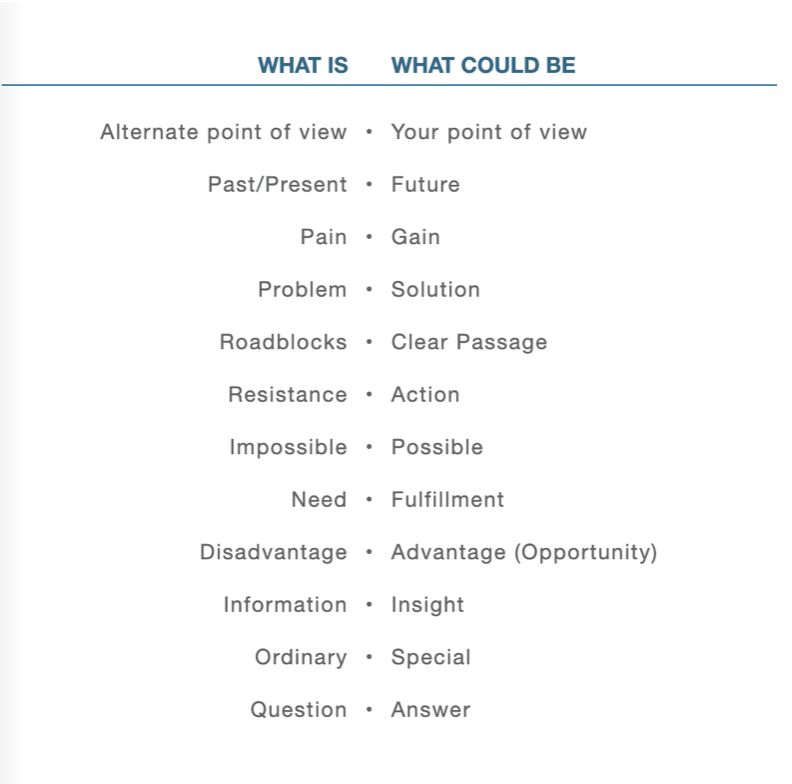
6-motion-infographicsI am adding more extensive script content here to help guide you:
3. Motion Infographic Examples:
- Epson Project Motion Infographic | Killer Infographics
- Motion Infographics | Killer Infographics
- Iconography in Narrative | Boston Marathon
- The Value of Data Visualization
- NoFoodWasted
- Google: Project Fi (explainer video example)
- Vimeo: Motion Infographics
- Raw Graphics | graph generator from raw data
- The Solar System
- Good.is | infographic resource
- For Inspiration:
- Different Styles for Explainer Videos
- Travel Portland
- Google – How On-Hub Keeps your Wifi Fast
- Space Sex is Serious Business
- Chaser main title
- Parallax Sequence
- Tri-Motion
- Digital Brew | Explainer Videos, motion agency in Orlando, FL
How to Write Sources in Motion:
- Sarah Swanson Motion Infographic using Citations
- Population Growth (sources at end)
- Colorblindness (sources at end)
- Blood-Injection-Injury Phobia (sources in comments)
- Purdue Owl for Citations (use MLA)
SECTION II – P3
4. Project 3: Motion Infographic/Explainer –
due: Monday 11.24
P3 Process Work
Post/Post to a story called “Principles of Design in Motion: Ideation” on Medium. How to post on Medium.
- 8. Draft Review Post (Mon 11.3) & 9. Comments (through next Wed. 11.5) – Comment to work of others on P3_Narrative_scripts_F25.pptx. Continue revising your narrative draft. Be pithy—use as few words as possible for voice-overs. Keep the script lean and let the visuals do most of the talking. Write and rewrite. Narrow your complete, outline your story in 5 sentences. (It is okay if you have more than 5 sentences to support your idea, but keep in mind the 60–90s duration).
- 10. Due Mon: 3 Styleframes (1920px x 1080px): A single, STATIC frame that depicts the look and feel. Visual considerations coalesce with narrative, composition, and motion. All choices must be rooted in concept. Each styleframe should be a completely different visual direction and may pull from different conceptual directions. Using the same layout/composition, and simply changing the typeface will result in a grade deduction. Spend time creating three completely different visual directions, and avoid committing to “your favorite” too early on. Each direction should be strong. You will more than likely need to explore more than 3 visual directions to result in 3 strong directions. Consider breaking your design time into a minimum of two sessions (an initial sprint + a refinement session). Upload to the bottom of your Medium Process story you created last week.
- 11. Due Mon: Rough Storyboard: (suggested methods: index cards OR .ai artboards OR storyboarding paper above): Brings together the script with the visuals. Indicate framing, as well as how elements will enter, exit, move throughout the frame. Minimum of 15 frames (title slide + content + consider transitions)
- 12. Styleframes Critique: P3 Crit #1 – Post/Comment to Discussion Board on D2L “P3: Styleframes” (post by Mon @ noon / 3 comments by next Wed 11.5 @ noon. In D2L, go to Communications > Discussions).
- 13. Due Mon: Text Animation Motion Test (2s+ test on initial motion). Develop 2s in AE. Select any scene in your storyboard for this motion test. Render. Post to Vimeo + Import to the bottom of your Ideation Story on Medium (if you struggle to post to Medium, please just post to Vimeo)
- 14. Due end of week 11: For audio, decide whether your P3 will have:
Guide to Creating a Strong Voice Over- (A) Voice-Over – can also include music behind the voice-over.
- (B) Music Only – entire narrative needs to be written for the viewer to read. Post your decision to the bottom of your P3 Ideation Story on Medium.
*This week, include the link to your audio choice (or upload) post to the bottom of your P3 Ideation Story on Medium. Use stock audio sites with a Creative Commons license. Careful when linking to any copyrighted on Youtube as it can flag your Medium post. Use Quicktime or another audio tool to record your music, but be mindful not to steal audio without the free use license.
Audio Resources
- Soundly
- MusOpen
- AudioBlocks
- http://freemusicarchive.org/curator/Creative_Commons/
- https://archive.org/details/netlabels
- http://www.beatpick.com/
- https://www.bensound.com/royalty-free-music/3
- http://magnatune.com/genres/
- https://freesound.org/browse/tags/music/
- https://musopen.org/
- http://surf4u.com/
- https://filmstro.com/music
- https://www.purple-planet.com/royalty-free-music
- https://www.hooksounds.com/
15. Course Schedule through Finals Week
- week 10
- m 11.3 due: narrative draft, big idea (narrative draft review begin), 3 styleframes, storyboard, 2s motion test (critique begin)
due: (narrative draft review end)
- m 11.3 due: narrative draft, big idea (narrative draft review begin), 3 styleframes, storyboard, 2s motion test (critique begin)
- week 11
- w 11.5 due: critique ends – on 3 styleframes, storyboard, 2s
- m 11.10 due: 10s development (critique begin)
- week 12
- w 11.12 due: 10s critique (crit end – comments due)
- m 11.17 30s development (final critique begin); E4; Begin P4 (50pts)
- week 13
- w 11.19 due: 30s critique comments due
- m 11.24 due: Final P3 deadline (100pts); p4 brainstorming / mood boards / 20 sketches
- week 14 (Thanksgiving)
- No deadlines until Monday, December 1st @noon.
- week 15
- m 12.1 11.21@noon 2 static designs + storyboards crit + initial motion test
- w 12.3 due: Motion Poster (critique begin) – our critique will run wed-mon this week due to the holiday schedule and finals.
- m 12.8 due: Motion poster (critique end comments due)
- week 16
- m 12.8 Final review live crit / one-on-one w/Cass
- w 12.10@noon – Final P4 deadline
SECTION III – AE
16. AE Demos
18. Exercise 4: Animated Data Story (15pts) – 11.17
This is the last of 4 exercises in this course. Please review the requirements and rubric before beginning.
Objective: Create an 5-10 second animated infographic that visually communicates a statistic or fact. This exercise allows flexibility in animation techniques, supporting you in crafting a clear and engaging visual story that directly connects with Project 3.
1. File Setup and Management:
Create a Composition: Set the duration to 5-10 seconds with dimensions of 1920 x 1080 pixels.
Background: Create a background (solid, pictorial, texture) that best stages your content. It should enhance your "micro story".

2. Audio Integration:
Select an Audio Track: Choose a creative commons audio track from a site like Free Music Archive. The audio should complement the tone of your statistic or fact.
Fade In/Out: Integrate the audio track into your composition, with a fade in at the start and fade out at the end to ensure a smooth transition.

3. Data and Visual Representation:
Choose a Statistic or Fact: Pick a statistic or interesting fact that you find compelling. This could relate to a topic you're covering in your infographic/explainer video project. This data point will be the central focus of your animation.
Visualize the Data: Create a simple infographic element (e.g., bar chart, pie chart, icon, percentage) that illustrates the statistic. Choose a design that visually represents the data clearly and accurately.Use infographic elements like icons, charts, or text overlays to clearly and creatively represent the statistic.

4. Subject - Character and Image Integration:
Select a Subject - Character or Icon: Use a character, icon, vector, or masked image that complements your statistic or theme. This image can be a transparent PNG, vector graphic, or a masked element from a photo.
Animation Option: Choose between using the Puppet Pin tool for organic character motion (e.g., bending, walking, jumping) or traditional techniques like rotation, scaling, or position changes. The movement should enhance the storytelling without distracting from the data.

5. Motion and Timing:
Choreography and Sync: Ensure that each animated element—whether character, chart, or text—moves in harmony with the audio track’s rhythm. This includes attention to timing, rotation, scaling, or position changes, as well as subtle pauses or accelerations.
Flexibility in Animation: Use the Puppet Pin tool, basic transformations (e.g., rotation, scale, position), or a combination to create smooth and intentional motion.

6. Formal Design Qualities:
Design Principles: Apply formal design qualities, including typographic choices, color harmony, and layout structure. Ensure clarity of information through effective hierarchy, balance, and interaction with frame edges.
Consistent Visual Style: The design should look polished and cohesive, using positive/negative space thoughtfully to guide the viewer’s eye.

7. Rendering and Submission:
Render Your Composition: Render in H.264 format using the Vimeo 1080 preset. Upload to D2L + Vimeo (if possible). If possible, submit the link via D2L.
| E4 Criteria | WEAK / MISSING | AVERAGE | GOOD | EXCEPTIONAL | Points |
|---|---|---|---|---|---|
| Audio Integration: Appropriate choice of audio track with smooth fade in/out transitions, enhancing the mood or message. | 0 | 0.5 | 1 | 2 | / 2 |
| Statistic Presentation: Clear and creative presentation of a relevant statistic or fact using infographic visuals (chart, icon, etc.). | 0 | 1 | 1.5 | 2 | / 2 |
| Source Attribution: Clear attribution of the statistic’s source, placed at the end, bottom, or in video comments. | 0 | 1 | 1.5 | 2 | / 2 |
| Character and Image Animation: Effective use of Puppet Pin or other animation techniques (e.g., rotation, scale, position) to create engaging movement that complements the statistic. | 0 | 1 | 2 | 3 | / 3 |
| Motion and Timing: Well-timed, smooth animation synchronized with audio, demonstrating thoughtful pacing and smooth transitions. | 0 | 1 | 2 | 3 | / 3 |
| Formal Design Qualities: Strong visual design with cohesive typography, color, layout, and use of space, ensuring clarity and polish. | 0 | 1 | 2 | 3 | / 3 |
9. AE – Adobe MAX Conference Sign-Up
Adobe MAX is THIS week October 28–30th. I encourage you to attend at least one session.