📌 Weekly Structure (applies every week)
- Content Release: Mondays @ 11 AM (Tues @ 11 AM if holiday week)
- Deadlines: All assignments due Mon @ noon (or Tue when no Monday class)
- ZOOM : Optional. Monday review + critique (recorded). If no Monday class → prerecorded review + Wed @ noon live session.
- Critiques:
- Regular weeks: Mon @ noon → Wed @ noon
- No Monday class: Tue @ noon → Thu @ noon
- Use discussion board if not in ZOOM
- Remote Office Hours: Wednesdays, 1–3 PM → Schedule Here
Week 2 Links & Notes
(specific to this week)
- 📹 Watch Now: Week 2 Review (pre-recorded) → [Watch Here] 26m – required
Live Sessions This Week:
👉 Join Live: Wed 9.3 @ noon (Mid-week 2)→ [Join Here]
📺 Watch Later: Wed 9.3 Recording → [Watch Here] optional to watch—reviewed 2 students projects. Could be helpful to watch for additional guidance.
Looking Ahead (Week 3)
Next live (recorded) session: Mon Sept 8 @ noon (only live session in Week 3)
*non-holiday weeks we will meet on Mondays
This week’s deadlines:
Monday, Sept. 8 @ noon
- 5. Audio transcript – Type out and post to bottom of recent Ideation Story on Medium
- 6. Three Styleframes – Design in Illustrator or Photoshop. Export as JPEG and post to bottom of recent Ideation Story on Medium. (Also, post to D2L P1 Styleframe Critique before 1PM if you are not participating in Monday’s Live Zoom critique)
- 8. Storyboard – Create in sketchbook, using index cards, or in software. Take photo/export and post to bottom of your Ideation Story on Medium
- 9. 2s Motion Test – Develop in AE. Render. Post to Vimeo + paste Vimeo link to the bottom of your Ideation Story on Medium (if you struggle posting to Medium, please just post to Vimeo)
- 12. Either email Cass your Vimeo link (creese@pennwest.edu) -OR- post your 2s audio clip uploaded to Vimeo to the “P1: 3 Styleframes” Critique in D2L.
- 15. Begin Exercise 1 – due week 3 – monday, 9.15
7. Critique: P1 Styleframes + Storyboard + Motion Test – For credit, either participate in live monday 9.8 critique, OR provide comprehensive peer feedback on 3 peer’s styleframes, storyboard, and 2s motion test by next wednesday 9.10. IF you did not participate in Monday’s Zoom critique, you are required to provide styleframe feedback to 3 others in the class and review their Medium posts before giving feedback).
Next week, we will move on to Exercise 2. For P1, we will use styleframe feedback to revise styleframes and storyboards and move on to developing our first 10s of P1 for a Zoom or Discussion Board Critique.
Weekly Content
Week 2 (though not required, it is recommended you move through in sequence. All items need to be complete by Monday @noon):
- Attend or watch recording of Monday Zoom. We will review this week’s content.
SECTION I – Motion Design Process - Watch Lecture Video #1 – Lecture: Motion Design Process
- Review Motion Process Resources
SECTION II – P1 - Continue development of P1 Kinetic Typography
- Due Mon 9.8: Write or type out your audio transcript
- Due Mon 9.8: 3 Styleframes (post to Medium)
- P1 Crit #1 –Participate in next 9.8 Monday Zoom Critique or Post/Comment to Discussion Board on D2L “P1: Styleframes” by next 9.10 Wednesday @noon. Comment on 3 others by next Wednesday @ noon (if you do not attend Monday’s ZOOM). You only need to participate in one or the other.
- Due Mon 9.8: Storyboard
- Due Mon 9.8: 2s Motion Test
- Review Kinetic Type Resources
SECTION III – AE - Create a free Vimeo account. (We will use Vimeo for uploading our videos after rendering)
- Watch Demo AE Videos
- Review After Effects Resources
- Begin Exercise 1: Due week 4 – the following Mon. 9.15
SECTION I – Motion Design Process
2. Motion Design Process
In this section, you will find a lecture video, lecture file, and resources related to motion design process work.
Video #1 – Lecture: Intro to Motion Design
3. Motion Process Resources
SECTION II – P1
4.
Project 1: Kinetic Typography
due: Monday 9.29 @noon
Continue P1 Kinetic Typography. This week, we will continue with ideation and narrowing our ideas in the creation of our moodboard, 3 styleframes, and 2s motion test. End of the week, we will have a critique on our 3 styleframes. Next week, we will prepare for a critique on our first 10s of motion development.
For project 1, use type creatively through various typographic treatments such as manipulating the tracking or leading to create rhythm; changing the opacity, size, or weight to create contrast; distorting through pulling, pushing, or blurring; exploring outlines, layering, or using type as a texture. Keep placement and transitions consistent. Allow enough time for the viewer to read text.
P1 Process Work
Post/Post to a story “P1 Kinetic Typography” on Medium. How to post on Medium.
5. Audio Transcript – Due Mon.
Write or Type out entire transcript of audio. Upload to the bottom of your Medium Process story you created last week.
6. 3 Styleframes (1920px x 1080px) – Due Mon.
A styleframe is a single, STATIC frame that depicts the look and feel. Visual considerations coalesce with narrative, composition, and motion. All choices must be rooted in concept. Each styleframe should be a completely different visual direction and may pull from different conceptual directions. Using the same layout/composition, and simply changing the typeface will result in a grade deduction. Spend time creating three completely different visual directions, and avoid committing to “your favorite” too early on. Each direction should be strong. You will more than likely need to explore more than 3 visual directions to result in 3 strong directions. Consider breaking your design time into a minimum of two sessions (an initial sprint + a refinement session). Upload to the bottom of your Medium Process story you created last week.
7. Styleframes Critique – next Mon–Wed @noon
Participate in next Monday‘s Zoom Critique or Post/Comment to Discussion Board on D2L “P1: Styleframes” (post by Mon 9.8 @ noon / 3 comments by Wed @ 9.10 @noon. In D2L, go to Communications > Discussions). You only need to participate in the D2L critique if you do attend the Wednesday Zoom.
8. Storyboard – Due Mon.
(suggested methods: index cards OR .ai artboards OR storyboarding paper above): Brings together the script with the visuals. Minimum of 12 frames that indicate framing, as well as how elements will enter, exit, move throughout the frame. Indicate significant events. Write corresponding audio script on back (index cards) or next to artboard (ai) and number the sequence.

9. 2s Text Animation Motion Test
Develop 2s in AE. Select any scene in your storyboard for this motion test. Render. Post to Vimeo + Import to the bottom of your Ideation Story on Medium (if you struggle posting to Medium, please just post to Vimeo)
10. Kinetic Type Resources
- Review Using Kinetic Type to Convey Emotion
- Review4 Approaches to Kinetic Typography
- Literal Illustration of Language (semantic significance)
- Rhythmic Embellishment of Language (temporal alignment)
- Personification of Language (typographic personality)
- Polymorphous Disruption of Language
- Inspiration: Kinetic Typography Channel
SECTION III – AE
11. Vimeo Account Creation. We will use Vimeo for uploading our videos after rendeirng. Create a free Vimeo account. Next week, we will submit our Vimeo link to the D2L assignemtns folder in week 3.
12. AE Demos
In After Effects, this week continues with interface review, keyframe basics, Shapes Layer vs Solid Layer, Single Compositions: Layers, Trimming, Splitting, Text Layers, Importing PSD vs AI (download demo files below. If issues opening, right click on link and select “save link as“), and rendering. Please watch the videos below, review the resources, and complete Exercise 1. The handout below can be used for quick reference while working through the application.
AE Handout: Intro to After Effects
Note: Please use this preset when rendering in AE.

13. AE Resources
- 30 AE Keyboard Shortcuts
- Review Managing Layers in AE
- Review Shape Layer, Solid Layer, and Text Layer
- Review this article on Layer Properties down to “adjust audio values”
- Review Animating Text with Text Animators
- Converting Text to AE from Illustrator
- Why H.264?
- AE: Video Codecs | Vimeo
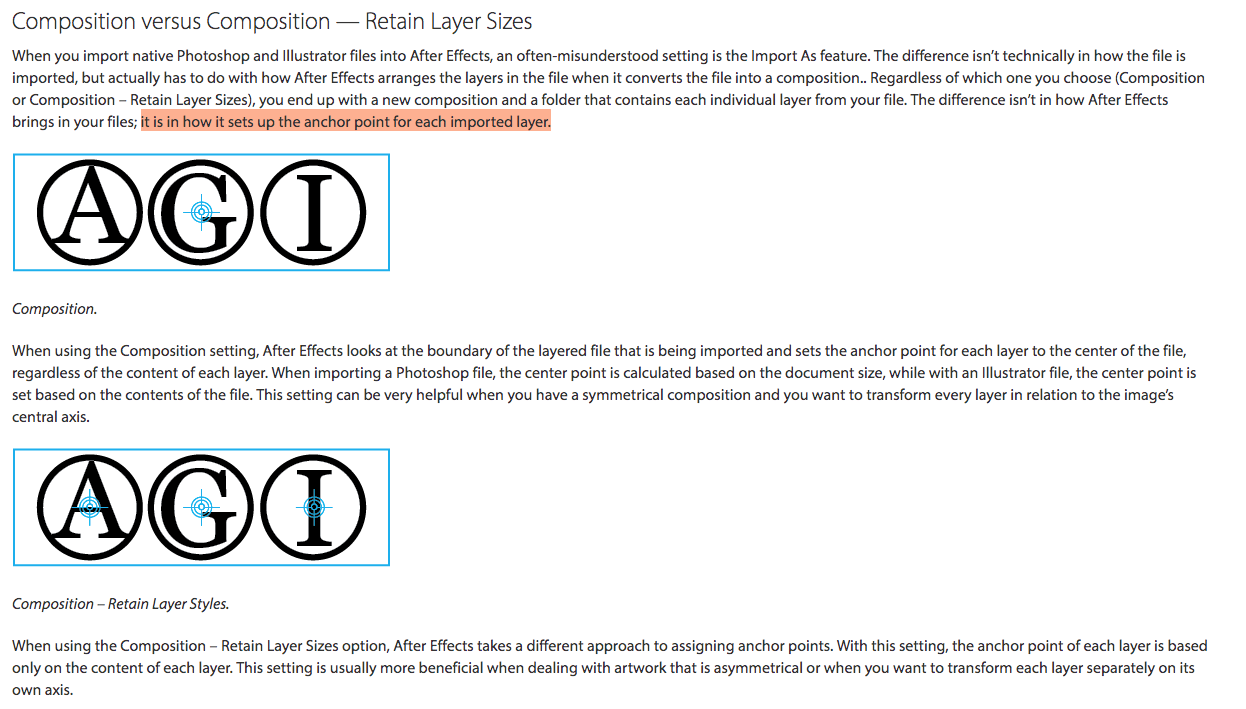
Note: Settings when Importing Files into AE
14.
Exercise 1
This is the first of 4 exercises in this course. Please review the requirements and rubric before beginning.
Exercise 1 Steps
Exercise 1:
Create a 5-10 second After Effects composition that animates a shape and personal mantra or quote. This exercise introduces basic animation techniques, file setup, and design principles.

1. File Setup and Management:
- Create a composition in After Effects with a duration of 5-10 seconds and dimensions of 1920 x 1080 pixels.
- Set up your project with a solid color background using a solid layer.
- Save and manage your files properly, including organizing assets in your project folder.

2. Shape Creation and Animation:
- Design a shape (e.g., circle, square, triangle) that symbolizes something personal to you.
- Animate this shape to move across the screen, incorporating both rotation and position changes. The movement should be smooth and visually engaging.

3. Text and Importing:
- Choose a personal mantra or quote that resonates with you.
- Create a .psd file with your text, ensuring the text is spread across multiple layers. Import the .psd file into After Effects as a composition retaining layer sizes.(You can use Illustrator, just remember to export as a PSD)
- Animate the text to convey the meaning or emotion behind the quote, ensuring it complements the movement of the shape.

4. Animation Techniques:
- Focus on the choreography of your animation, considering how the shape and text move together over time.
- Pay attention to timing, pacing, and how these elements contribute to the overall tone and message of your composition.

5. Formal Design Qualities:
- Ensure your composition demonstrates strong visual design, including effective use of type, color, scale, and space.
- Strive for balance, contrast, and a clear visual hierarchy that enhances the message of your personal mantra or quote.

6. Rendering and Submission:
- Render your composition in H.264 format with the Vimeo 720 preset.
Upload your final video to Vimeo and submit the link.
Exercise 1 Rubric
File Setup and Management (0–3 pts)
Composition between 5–10s; Dimensions 1920 x 1080; Vimeo Setup; Solid Layer setup.
- Weak / Missing: 0
- Average: 2.25
- Good: 2.5
- Exceptional: 3
Shape (0–3 pts)
Shape represents a personal value or symbol; moves in rotation and position throughout the scene.
- Weak / Missing: 0
- Average: 2.25
- Good: 2.5
- Exceptional: 3
Text (0–3 pts)
Personal mantra or quote imported from .psd file; Animation applied to motion text to convey meaning.
- Weak / Missing: 0
- Average: 2.25
- Good: 2.5
- Exceptional: 3
Animation Techniques (0–3 pts)
Design demonstrates exploration of software skills, choreography of shape and text movement, rotation, or scaling over time; Consideration of pacing and emotion.
- Weak / Missing: 0
- Average: 2.25
- Good: 2.5
- Exceptional: 3
Formal Design Qualities (0–3 pts)
Visual style; consideration of positive/negative forms within changing space; integration of personal theme with type, color, scale, and hierarchy.
- Weak / Missing: 0
- Average: 2.25
- Good: 2.5
- Exceptional: 3
Exercise 1 Render + Submission:
Include all elements in one composition and send to Adobe Media Encoder (wait a moment for application to open).
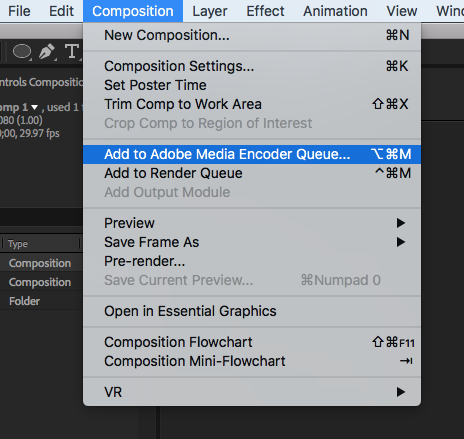
Select Format: H.264, Preset: Vimeo 1080p HD (final projects), Vimeo 720p HD (exercises OR projects), Vimeo 480p (personal drafts only)

Upload to Vimeo (500MB upload limit per week). If you haven’t sent the Vimeo link, Copy/paste your Vimeo video link to email and send to cass.reese@gmail.com (subject: Exercise 1). You only need to send me your Vimeo link once.