9.25 | principles of mg – p2

Due Today: Project 1

For Today:

  • P1 Final Presentations: Approx 1 minute—briefly describe concept (narrative, mood, contrast, and formal) and formal choices.
  • Introduce P2: Principles of Design in Motion
4-principles-of-motion-graphics
Today’s Resources:

P2 Examples

Project 2 Schedule

9.25 – Begin P2; Lecture: Principles of Motion Graphics
9.30 – E2 due; AE Demo: Animated Paths/Image Masks/Effects; Exercise 3 (due 10.14); P2 process small group Crit #1
10.2 – Crit #2 – 3 Styleframes / rough Storyboard
10.7 –  AE Demo: Cameras; Exercise 4 (due 10.21); Crit #2 – 10s / revised storyboard
10.9  – Crit #3 – 20–30s
10.14 – P2 Studio
10.16 – SUBMIT P2; Final Presentation; Begin P3

Due Next Class:

Post/Post to a NEW story called “Principles of Design in Motion: Ideation” on Medium. How to post on Medium.

9.23 | history + p1 studio

For Today: Lecture: History of Motion Design; P1 Studio

5-history-of-motion-graphics

Today’s Resources

Project 1 Schedule
  • 9.25 – SUBMIT P1; P1 Final Presentation; Begin P2; Lecture: Principles of Motion Graphics

Final Presentations: For our first project, present to the class your concept and final project. If you run into issues within Vimeo, do not worry about uploading the final to Vimeo, but upload to D2L Project 1 assignments folder. For your rationale/presentation, describe the concept (narrative, mood, contrast, and formal) and formal choices. Remember to include both the name of your typeface(s) and WHY they were selected to support your concept. All of your choices should support how you want your work to feel.

AE – Adobe MAX Conference Sign-Up

We will not have any new demos in AE this week as you finalize P1 and begin P2. Next week, we will continue with image masks, the pen tool, bezier shapes, adjustment layers, and effects.

This week, I would like you to sign up for the Adobe Max Conference (free online) and begin looking at the sessions (below) in After Effects (or Photoshop, InDesign, and Illustrator) you would like to attend end of October.

Adobe MAX is one of the biggest events for graphic designers, VFX artists, web designers, and more from around the world to come together and explore what’s next for creatives.

View the Session Catalog

https://max.adobe.com/max-online/

Adobe Max Guide

Post navigation

Due Next Class: Final Project 1 (submission guidelines on last post)

Exercise 2 due next Tuesday

week 5 | online | 9.22–9.28

📌 Weekly Structure (applies every week)


Week 5 Links & Notes
(specific to this week)

Live Sessions This Week:

👉 Join Live: Mon 9.22 @ noon – Week 4 Review + P1 20-30s Critique
→ [Join Here]

📺 Watch: Mon 9.15 Review + Live Crit Recording → [Watch Here] approx. 23m

Looking Ahead (Week 6)

Next live (recorded) session: Mon Sept 29th @ noon (only live session in Week 6)


This week’s deadlines:
Wednesday, Sept. 24 @ noon

  • P1 Crit #3-Participate in Monday’s Zoom Critique or Post/Comment to Discussion Board on D2L “P1: 20–30s Crit” by Monday @noon. Comment on 3 others by Wednesday@noon (if you do not attend Monday’s ZOOM). You only need to participate in one or the other.
    Note: This is a lighter week so you can focus entirely on catching up with any missed work and creating a successful project 1.

Monday, Sept. 29 @ noon

  • Due: Final Submission of zipped Project 1 (review guidelines below) to D2L “Project 1” assignments folder + upload final video render to Vimeo
  • Due: Exercise 2 (Submit to vimeo + d2L)

Next week, we have Exercise 3, numerous AE demos, and will begin our P2 development.


Weekly Content

Week 5 (though not required, it is recommended you move through in sequence. As everything is due by end of the week, it is best to work ahead. All items need to be completed.):


  1. Attend or watch a recording of Monday Zoom. We will review this week’s content and critique the live work for anyone present.

    SECTION I – The Principles of Animation
  2. Watch Lecture Video – Lecture: Principles of Motion Graphics
  3. Review Principles of Motion Graphics Resources

    SECTION II – P1 Submission + P2 Introduction
  4. Due Mon.: Finalize and turn in P1 Kinetic Typography
  5. Review P1 Submission Guidelines on Week 4 before submitting.
  6. Due Mon.: Final Presentation Rationale (post to Vimeo, or Medium)
  7. Due Mon.: Design Boards (file for download) turn in with P1 on D2L
  8. Introduce P2: Principles of Design in Motion
  9. Due the following Mon. Oct 5th: P2 Ideation: For those that want to work ahead, brainstorm 20 themes, 3 mindmaps, thumbs for 3 themes, narrow to top theme, and continue with sketches (post to Medium)
  10. Due Mon.: Finalize and Submit Exercise 2 via Vimeo + D2L “exercise 2” folder (details in week 4)

    SECTION III – AE
  11. Optional: Sign-up for Adobe MAX Conference

SECTION I – PRINCIPLES OF ANIMATION

2. Principles of Animation

This week focuses on the 12 principles of animation and starting to think about our next project. We are not officially starting the project until next week. It is okay if you wait until next Monday to start this lecture as we will not have a lecture next week (just don’t forget to go back). Sharing to give you the option to get an early start.

4-principles-of-motion-graphics

P2_PrinciplesofMotion

3. Principles Resources:

SECTION II – P1 + P2 Introduction

4.

Project 1: Kinetic Typography

due: Monday 9.29 @noon

Finalize and Submit P1 Kinetic Typography (due THIS WEEK – the end of week 5) and turn in our final work.

5. P1 Final Submission (also review week 4)
  • Project 1 Final: Final motion design uploaded to Vimeo. Upload your final files in a ZIPPED folder named “lastname_p1_kineticType” to the assignments folder on D2L “Project 1”.
    • In zipped folder, FINAL .aep file
    • In zipped folder, FINAL movie rendering @1080p or 720p (do not need process renderings)
    • In zipped folder, Design Boards (file for download) – PDF please, uncheck “illustrator editing capabilities”
  • All process work (PDFs, JPEGs, PNGs) needs to be on Medium post (not in zipped folder)
    • initial audio research and ideation
    • brainstorming/sketches
    • mood boards / type exploration
    • motion script
    • storyboard
    • 3 styleframes
    • 2s motion test

6. Final Presentations (rationale): (2.5% of Final Grade) For our first project, you will either be (1) writing a rationale of your concept for your final work or (2) record a video of you describing your concept and posting it in D2L Discussion Board > P1 Final Presentations. If you run into issues within Vimeo, do not worry about uploading the final to Vimeo. For your rationale/presentation, describe concept (narrative, mood, contrast, and formal) and formal choices. Remember to include both the name of your typeface(s) and WHY they were selected to support your concept. All of your choices should support how you wanted your work to feel.

7. Create Design Boards (file for download) (2.5% of Final Grade) Please refer to Zoom recording below. Note: drag and and drop link to new tab if you have a PC.

Design Board how-to

8.

Project 2: Principles of Design in Motion

due: Monday 10.27

Begin P2: Principles of Design in Motion next week and we will work on ideation and refine to one theme next week.

Looking ahead, next week we will move into styleframes and a rough storyboard (due the following Monday), as well as audio research.

9. P2 Process Work

Post/Post to a NEW story called “Principles of Design in Motion: Ideation” on Medium. How to post on Medium.

Due the following Mon. Oct 5th – (posting for anyone wanting to get a head start on ideation)

Mind maps by Taylor English, Sarah Beth Hulver, and Lauren Peterson from http://motionographer.com/2015/12/16/author-of-design-for-motion-talks-industry-education-and-the-state-of-design/


SECTION III – AE

11. AE – Adobe MAX Conference Sign-Up

We will not have any new demos in AE this week as you finalize P1 and begin P2. Next week, we will continue with image masks, the pen tool, bezier shapes, adjustment layers, and effects.

This week, I would like you to sign up for the Adobe Max Conference (free online) and begin looking at the sessions (below) in After Effects (or Photoshop, InDesign, and Illustrator) you would like to attend Oct 28-30th.

Adobe MAX is one of the biggest events for graphic designers, VFX artists, web designers, and more from around the world to come together and explore what’s next for creatives.

Adobe Max Guide

View the Session Catalog

https://max.adobe.com/max-online/

9.18 | p1 final crit

Due Today: 20-30s of P1 rendered (uploaded to Vimeo or D2L and ready for full class crit)

For Today: Full Class Crit

Final Considerations:

  • Does your kinetic motion design support or hinder your audio?
  • The what: typographic choices communicated in a planned sequence
  • The how: use of spacing, timing, speed, pacing, and movement
  • Consider how positive/negative forms change through motion and transition.
  • Give attention to the manner elements appear and leave the frame.
  • Consider how the text interacts WITHIN the frame’s edges.
  • Do your formal choices express your motion?
p1_rubric-2-1
Project 1 Submission:
  • Project 1 Final: Upload your final files in a ZIPPED folder named “lastname_p1_kineticType” to the assignments folder on D2L “Project 1”.
    • In zipped folder, FINAL .aep file
    • In zipped folder, FINAL movie rendering @1080p or 720p (do not need process renderings)
    • In zipped folder, Design Boards (file for download) (2.5 pts) – process video below
  • Also, upload final motion design to Vimeo (if possible).
  • On Medium, all process work (PDFs, JPEGs, PNGs) needs to be on Medium post (not in zipped folder)
  • 3 audio selections and initial ideation
  • brainstorming/sketches
  • mood boards / type exploration
  • motion script
  • storyboard
  • 3 styleframes
  • 2s motion test
Design Board how-to

Project 1 due 9.25

Exercise 2 Due 9.30

9.16 | spatial + track mattes

Due Today: Continue development of P1; Exercise 1 

For Today: Demo: “Flip the Bird” Spatial Interpolation + Track Mattes; Studio for E2 + P1 motion design development

bird.png (right click to save)
AE Resources

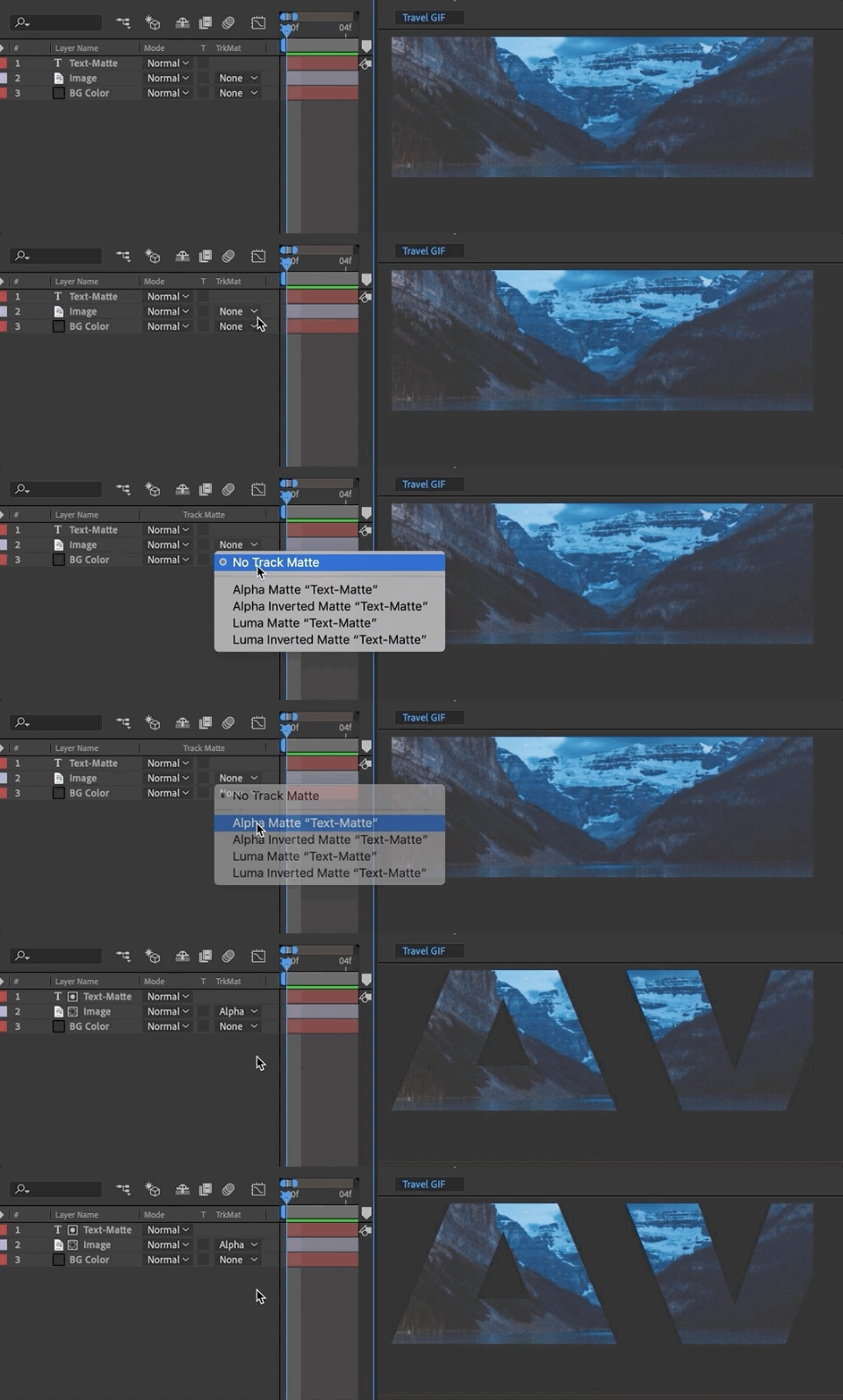
Compositing is placing one image on top of another (such as text on a photo). Mattes are used to isolate one portion of an image—such as a layer mask or track matting where one layer references the transparency of another layer.

Spatial Interpolation + Track Matte Demo

Issues with AE?
Cached Preview Error: https://www.schoolofmotion.com/blog/cached-preview
Space in AE: https://www.schoolofmotion.com/blog/ram-after-effects

Exercise 2

This is the second of 4 exercises in this course. Please review the requirements and rubric before beginning.

Exercise 2 Steps

Exercise 2 Rubric


For Next Class

  • P1 20–30s of motion design. Render BEFORE class and upload to Vimeo or D2L discussion (30s) for full-class crit.

Due 9.30

  • Exercise 2: Watch the 2 falling forms vids above for guidance. Once complete, upload to D2L Exercise 2 (upload to Vimeo, if possible, and upload link, (watch videos under today’s resources for additional guidance).
Project 1 Schedule
  • 9.16 – Demo: Spatial Interpolation + Track Mattes; Studio
  • 9.18 – P1 Final Crit #3 (20–30s)
  • 9.23 – Lecture: History of Motion Graphics; Studio
  • 9.25 – SUBMIT P1; P1 Final Presentation; Begin P2 – Lecture: Principles of Motion Graphics

week 4 | online | 9.15–9.21

📌 Weekly Structure (applies every week)


Week 4 Links & Notes
(specific to this week)

Live Sessions This Week:

👉 Join Live: Mon 9.15 @ noon – Week 4 Review + P1 10s Critique
→ [Join Here]

📺 Watch: Mon 9.15 Review + Live Crit Recording → [Watch Here] approx 45m

Looking Ahead (Week 5)

Next live (recorded) session: Mon Sept 22 @ noon (only live session in Week 5)


This week’s deadlines:
Wednesday, Sept. 17 @ noon

  • P1 Crit #2-Participate in Monday’s Zoom Critique or Post/Comment to Discussion Board on D2L “P1: 10s Crit” by Monday @noon. Comment on 3 others by Wednesday@noon (if you do not attend Monday’s ZOOM). You only need to participate in one or the other.

Monday, Sept. 22 @ noon

  • 8. 20s–30s of P1 development – Develop in AE. Render. Post to Vimeo + Import to the bottom of your Ideation Story on Medium + Post to D2L Discussion Board
  • 9. Exercise 2 – post to Vimeo as “Exercise 2” – due Mon. 9.29

Next week, Project 1 is due at the end of the week. We will begin discussing the Principles of Design which will lead us into our second project.


Weekly Content

Week 4 (Though not required, it is recommended you move through in sequence. To stay on schedule, it is recommended you have 1, 4, 6 completed by Wednesday@noon. All 10 need to be complete by Sunday @midnight):


  1. Attend or watch a recording of Monday Zoom. We will review this week’s content.

    SECTION I – Motion Design
  2. Watch Lecture Video – Lecture: History of Motion Graphics
  3. Review History of Motion Graphics Resources

    SECTION II – P1 + Exercise 2
  4. Continue development of P1 Kinetic Typography
  5. Review P1 Submission Guidelines
  6. P1 Crit #2-Participate in Monday’s Zoom Critique or Post/Comment to Discussion Board on D2L “P1: 10s Crit” by Monday @noon. Comment on 3 others by Wednesday@noon (if you do not attend Monday’s ZOOM). You only need to participate in one or the other.
  7. Due next Mon. 9.22: 20s–30s of p1 development in AE (post to Vimeo – and medium, if possible)
  8. Due next Mon. 9.29: Complete Exercise 2

    SECTION III – AE
  9. Watch Demo AE Videos
  10. Review After Effects Resources + Audio Resources (as needed)

SECTION I – MOTION DESIGN

2. Motion History

This week focuses on the history of motion graphics. Next week, we will move into the principles of motion design.

5-history-of-motion-graphics

SECTION II – P1

4.

Project 1: Kinetic Typography

due: Monday 9.29 @noon

Continue P1 Kinetic Typography (due at the end of week 5). This week, we will focus on the development of our motion designs with our final 30s critique.

P1 Final Considerations

Audio Guidelines for Motion Graphics

p1_rubric-2

5. P1 Final Submission

Design Board how-to
P1 Process Work

Post/Post to a story called “Kinetic Typography: Ideation” on Medium. How to post on Medium.

  • 6. 10s Critique: P1 Crit #2–Participate in Monday Zoom Critique or Post/Comment to Discussion Board on D2L “P1: 10s of Development” (post by Monday@noon / 3 comments by Wed@noon. In D2L, go to Communications > Discussions). You only need to participate in the D2L critique if you do attend the Monday Zoom. Post your link to your uploaded Vimeo file and describe your audio and how you want it to feel. Make note if you are looking for feedback on anything specific.

SECTION III – AE

9. AE Demos

In After Effects, this week we will learn about track mattes. Please watch the video below and review the resources. The handout below can be used for quick reference while working through the application.

bird.png (right click to save)

AE Handout: Intro to After Effects

Compositing is placing one image on top of another (such as text on a photo). Mattes are used to isolate one portion of an image—such as a layer mask or track matting where one layer references the transparency of another layer.

10. AE Resources
schoolofmotion.com

9.

Exercise 2

This is the second of 4 exercises in this course. Please review the requirements and rubric before beginning.

Exercise 2 Steps

Exercise 2 Rubric

9.11 | interpolation, graph editor, e2

Due Today: 10s of motion design for critique (upload to Vimeo or D2L Assignments “Vimeo Overflow”)

AE Keyboard Shortcuts

  • (s) scale, (p) position, (a) anchor point, (r) rotation, (t) opacity
    hold shift to select multiple
  • (u) see all keyframes for layer
  • (u + u) to see all adjusted properties
  • (+) or (-) to expand or zoom on timeline
  • (,) or (.) to expand or zoom composition panel, (shift + /) to fit to screen
  • (j) or (k) key to jump between keyframes in timeline
  • (shift + cmd + n) apply mask over text layer
  • (cmd + double-click) on pan behind (anchor point tool) to center anchor point
  • * add marker on timeline
For Today:
  • P1 Crit
  • Demo: Easing + Keyframe Interpolation, Parenting, & Graph Editor, Review Audio Guidelines

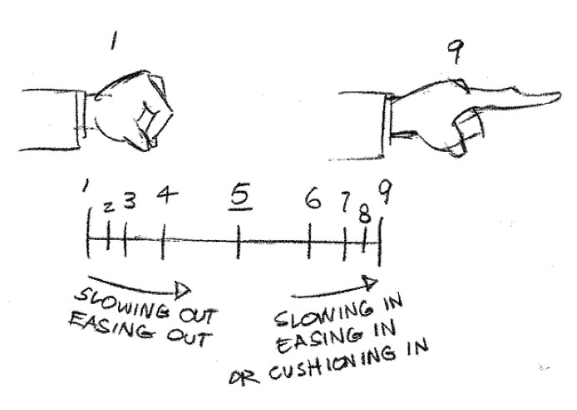
linear interpolation: Moves at a constant, steady speed between keyframes, like a mechanical motion. There’s no acceleration or deceleration.
example: elevator sliding up
bezier interpolation: Gives you precise control over the motion by adjusting handles manually. This allows for sharp curves and custom paths for smooth or dramatic changes. This is ideal when you need very specific control over acceleration, deceleration, and movement paths.
example: a bouncing ball manipulating the sharpness of the bounce
auto bezier interpolation: default spatial motion (moving objects) / AE automatically smooths the rate of change between keyframes, making it great for creating naturally curved motion paths.
example: a smooth camera pan or a drone flying through the air—you want the path to be curved but don’t need to manually control every part of it.
continuous bezier interpolation: auto smooth rate of change / AE automatically smooths the motion path for continuous, flowing movement. It’s a balance of manual control with automatic smoothing.
example: a leaf drifting through the wind—smooth, flowing movement with some control over how the leaf move through the air.
hold interpolation: only for temporal value / Used for sudden changes, like switching between two different values instantly without any smooth transition. Ideal for creating abrupt shifts in appearance.
example: a light turning on and off—abrupt changes.

AE Keyboard Shortcuts + Tips

  • (right click) on keyframe > keyframe interpolation to change temporal or spatial interpolation
  • (right click) on keyframe > keyframe assistant to add easing to keyframes
  • (control + 8) set marker
  • (cmd + click) on keyframes to change to auto or linear keyframe
  • (option + click) on properties to move entire motion path OR select all keyframes
CONCEPT

NARRATIVE: 
What is happening in your scene? 

MOOD:
What is the overall feeling?

CONTRAST:
Is there an inherent or defined contrast you are building from?

FORMAL CHOICES:
Then…how are your design choices communicating the above?

3–5 things you want to change.
Today’s Resources

AE Demos


https://medium.com/@gordonnl/ease-in-or-ease-out-ed9a0969042e

linked to original file: https://dribbble.com/shots/2315008-The-key

Curves = Acceleration and Deceleration

  • A curved line means speed is changing. If the curve is going up, the object is speeding up (accelerating). If it’s going down, the object is slowing down (decelerating).
  • When you see handles on the keyframes, use them to manually adjust how fast or slow the object moves. The longer you stretch the handle, the more gradual the change.
  • Flat Lines = constant speed.
  • Steep Curves = fast changes.
  • Shallow Curves = slow changes.
  • Use Easy Ease to quickly smooth out your animation. After Effects will automatically create a curve to help an object slow down or speed up gradually. This is great for a natural-looking animation.
  • Ease In: Starts slow, then speeds up (like accelerating from a stop).
  • Ease Out: Starts fast, then slows down (like braking a moving car to a stop).
  • Keep Learning: Create better eases in AE & Roving Across Time with Roving Keyframes

Audio Guidelines for Motion Graphics:

  • Keep overall audio levels below -6dB to avoid distortion and provide headroom for adjustments.
  • Dialogue/voiceovers should sit between -12dB and -6dB for clarity, and background music should be quieter, between -18dB and -12dB.
  • Use keyframes to fade audio in and out at the start and end of your motion videos for smooth transitions.
  • Balance audio layers (dialogue, sound effects, music) so no single element overpowers the others unless intentional.
  • Monitor audio levels using the Audio Meters panel (found under Window > Audio Meters) to ensure consistency and avoid peaking above 0dB.
  • Keep sound design simple—audio should complement, not distract from, the visuals.
  • Keep Learning: https://www.premiumbeat.com/blog/sound-in-after-effects/
Looking Ahead
  • Continue developing P1 motion design for 9.25 due date (remember to document all process work).
  • 20–30s due next Thursday for final crit.
  • Exercise 1 due next Tuesday, Sept 16th

Project 1 Schedule
  • 9.16 – Demo: Track Mattes; Lecture: History of Motion Graphics (may move to later date); Studio; Assign E2
  • 9.18 – P1 Final Crit #3 (30s)
  • 9.23 – Exercise 2 Due; Studio
  • 9.25 – SUBMIT P1; P1 Final Presentation; Begin P2; Lecture: Principles of Motion Graphics

9.9 | text animators, precomposing, audio

Due Today: Storyboards + P1: 2s Motion Test

For Today: Discuss: Motion Design Process; P1 Small Groups;Demo: Precomposing, Nesting, Text Masks, Text Animators, Audio Import

Motion Design Process
3-motion-design-process-v2-1

AE Keyboard Shortcuts

  • (s) scale, (p) position, (a) anchor point, (r) rotation, (t) opacity
    hold shift to select multiple
  • (u) see all keyframes for layer
  • (u + u) to see all adjusted properties
  • (+) or (-) to expand or zoom on timeline
  • (,) or (.) to expand or zoom composition panel, (shift + /) to fit to screen
  • (j) or (k) key to jump between keyframes in timeline
  • (shift + cmd + n) apply mask over text layer
  • (cmd + double-click) on pan behind (anchor point tool) to center anchor point

AE Demos

AE Resources
Audio Resources

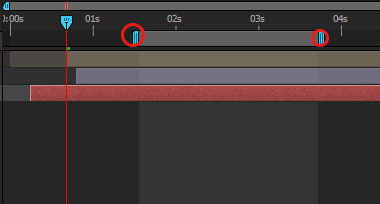
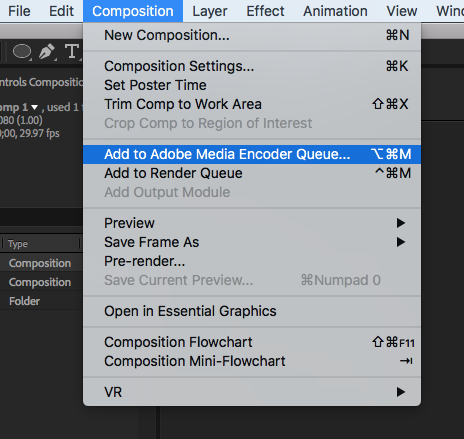
Important Note on Rendering: To render out a portion of your work rather than an entire composition, resize the work area on the right side of your timeline panel. The work area selected is the ONLY portion that will render out through the Adobe Media Encoder.

Due Next Class
  • 10s of Project 1 rendered before class WITH your audio. Do not upload to Vimeo or D2L, but have ready to play on your computer for critique. If necessary, continue revising storyboard or styleframes per feedback received in crits this past week. Note: Bring headphone for crit.

Due Next Tuesday

  • Exercise 1

Project 1 Schedule
  • 9.9 – Demo: Compositions/Masks/Audio Sources; Small Group Crit
  • 9.11 – Demo: Keyframe Interpolation/Time Remapping/Parenting/Graph Editor/Audio; Exercise 2; P1  Crit #2 (10s)
  • 9.16 – Demo: Track Mattes; Lecture: History of Motion Graphics; Studio
  • 9.18 – P1 Final Crit #3 (30s)
  • 9.23 – Lecture: Principles of Motion Graphics; Studio
  • 9.25 – SUBMIT P1; P1 Final Presentation; Begin P2 


week 3 | online | 9.8–9.14

📌 Weekly Structure (applies every week)


Week 3 Links & Notes
(specific to this week)

Live Sessions This Week:

👉 Join Live: Mon 9.8 @ noon – Week 3 Review + Styleframe Critique
→ [Join Here]

📺 Watch: Mon 9.8 Review + Live Crit Recording → [Watch Here] approx 30m

Looking Ahead (Week 4)

Next live (recorded) session: Mon Sept 15 @ noon (only live session in Week 4)
*non-holiday weeks we will meet on Mondays


This week’s deadlines:
Wednesday, Sept. 10 @ noon

  • 6. P1 Styleframes + Storyboard + Motion Test Critique – For credit, either participate in 9.8 live critique, OR provide comprehensive peer feedback on 3 peer’s styleframes, storyboard, and 2s motion test. IF you did not participate in Monday’s Zoom critique, you are required to provide styleframe feedback to 3 others in the class and review their Medium posts before giving feedback).

Monday, Sept. 15 @ noon

  • 8. Exercise 1 – post to Vimeo as “Exercise 1”
  • 4. 10s of P1 development – Develop in AE. Render. Post to Vimeo + Import to the bottom of your Ideation Story on Medium (if you struggle to post to Medium, please just post to Vimeo).
    • Note: 20–30s on P1 development will be due the following Monday 9.22 @noon.

Weekly Content

Week 3 (though not required, it is recommended you move through in sequence. All items need to be complete by Monday @noon):

  1. Watch recording of Weekly Review.

    SECTION I – Motion Design
  2. Read Motion Design Considerations

    SECTION II – P1
  3. Continue development of P1 Kinetic Typography
  4. P1 Crit #1 –Participate in Monday Zoom Critique or Post/Comment to Discussion Board on D2L “P1: Styleframes” by Monday 9.9 @noon. Comment on 3 others by Wednesday@noon (if you do not attend Monday’s ZOOM). You only need to participate in one or the other.
  5. Due next Mon. 9.15: 10s of p1 development in AE (post to Vimeo – and medium, if possible)

    SECTION III – AE
  6. Watch Demo AE Videos
  7. Review After Effects Resources + Audio Resources (as needed)
  8. Due Mon 9.15@noon Complete Exercise 1 (posted in earlier week)

SECTION I – MOTION DESIGN

2. Motion Design Considerations

This week focuses on manipulating numerous elements and adding easing qualities to your motion designs. Consider these ideas as you work on your P1 development:

  • Easing should be inspired by the qualities of the element. For example, an element with a heavier weight would fall faster and hit the perceived surface harder.
  • Lead the viewer’s eye with motion. Our eyes look towards whatever is animated. If too many elements are moving in contradictory motions, it can be visually confusing.
  • Pay attention to pacing. Is the type too fast or slow?
  • Refine type/audio alignment. Is the type appearing too soon or too late? Consider type that remains too long and competes with any incoming text.
  • Create typographic relationships. This is motion design. Rather than only making type appear and disappear with the audio, create relationships from one scene to the next.
  • Lastly, don’t over-animate and consider motion unity. Repetition with variation in how things move can avoid the design creating “motion soup.” Variation is good for creating interest but too much can feel chaotic. This is a balancing act and will take practice to refine.

SECTION II – P1

3.

Project 1: Kinetic Typography

due: Monday 9.29 @noon
Continue P1 Kinetic Typography.

This week, we will focus on the development of our motion designs with a 10s critique.

Looking ahead, next week we will have a final 30s critique next week.

P1 Process Work

Post/Post to a story called “Kinetic Typography: Ideation” on Medium. How to post on Medium.

  • 4. Styleframe Critique: P1 Crit #1 –Participate in Monday 9.8 Zoom Critique or Post/Comment to Discussion Board on D2L “P1: Styleframes” (post by Mon @ noon / 3 comments by Wed @ noon. In D2L, go to Communications > Discussions). You only need to participate in the D2L critique if you do attend the Monday Zoom. Post your link to your uploaded Vimeo file and describe your audio and how you want it to feel. Make note if you are looking for feedback on anything specific.
  • 5. Due next Mon 9.15: 10s of Project 1 rendered and uploaded to Vimeo WITH your audio. If necessary, continue revising storyboard or styleframes per the feedback received in crits this past week.)

SECTION III – AE

6. AE Demos

In After Effects, this week delves deeper into type (text masks), compositions (precomposing, nesting), keyframes (easing and interpolation), parenting, importing Audio Import – right click to save (demo file 1), (demo file 2), and the use of the graph editor. Please watch the videos below, review the resources, and complete Exercise 1. The handout below can be used for quick reference while working through the application.

AE Handout: Intro to After Effects

Important Note on Rendering: To render out a portion of your work rather than an entire composition, resize the work area on the right side of your timeline panel. The work area selected is the ONLY portion that will render out through the Adobe Media Encoder.

7. AE Resources

Types of Keyframes

AE Keyframe Shortcuts + Tips

AE Keyboard Shortcuts

AE Keyframe Interpolation

https://medium.com/@gordonnl/ease-in-or-ease-out-ed9a0969042e
linked to original file: https://dribbble.com/shots/2315008-The-key

Curves = Acceleration and Deceleration

  • A curved line means speed is changing. If the curve is going up, the object is speeding up (accelerating). If it’s going down, the object is slowing down (decelerating).
  • When you see handles on the keyframes, use them to manually adjust how fast or slow the object moves. The longer you stretch the handle, the more gradual the change.
  • Flat Lines = constant speed.
  • Steep Curves = fast changes.
  • Shallow Curves = slow changes.
  • Use Easy Ease to quickly smooth out your animation. After Effects will automatically create a curve to help an object slow down or speed up gradually. This is great for a natural-looking animation.
  • Ease In: Starts slow, then speeds up (like accelerating from a stop).
  • Ease Out: Starts fast, then slows down (like braking a moving car to a stop).
  • Keep Learning: Create better eases in AE & Roving Across Time with Roving Keyframes

9.

Exercise 1

Due this Monday 9.15 @noon.

Review the full exercise description on week 2.

9.4 | ae: rendering, p1 crit 1

Due Today: AE Demo: Part 2; P1: 3 Styleframes (posted to Medium before start of class)

For Today:

  • Rendering using Adobe Media Encoder
  • Create free Vimeo account and submit to THIS FORM
  • P1 Small Crit #1 – Styleframes (split crit)
Exercise 1 Render + Submission: 

Include all elements in one composition and send to Adobe Media Encoder (wait a moment for application to open).


Select Format: H.264, Preset: Vimeo 1080p HD (final projects) or Vimeo 720p HD (exercises or drafts of projects)

Upload to Vimeo (500MB upload limit per week). 

Copy/paste your Vimeo video link to email and send to cass.reese@gmail.com (subject: Exercise 1). Remember to include your last name in all filenames! 
Today’s Resources
Due Next Class
  • Remember to post your audio research to your Medium.
  • Type out your full script and post to Medium.
  • Storyboard: Reference your transcript of audio. Upload to the bottom of your Medium Process story you created last week. (suggested methods: index cards OR .ai artboards OR storyboarding paper above): Brings together the script with the visuals. Minimum of 12 frames that indicate framing, as well as how elements will enter, exit, move throughout the frame. Indicate significant events. Write corresponding audio script on back (index cards) or next to artboard (ai) and number the sequence.
  • Text Animation Motion Test (2s+ test on initial motion) Develop 2s in AE. Select any scene in your storyboard for this motion test. Render. Post to Vimeo + Import to the bottom of your Ideation Story on Medium. Looking ahead, 10s will be due next Thursday.

Due Tuesday 9.16

  • Exercise 1 (upload to Vimeo).

http://threesixtyeight.com/insights/storyboarding-motion-graphics/